Search engines help websites appear in search results and gain traffic. However, some parts of a website need to be hidden from search engines to avoid penalties or prevent sensitive information from being exposed to the public. The robots.txt file helps ensure this by directing search engines on which pages to index and which to avoid. Let's take a closer look at what robots.txt is, its purpose, and how to protect important pages from search engines.
What Is the robots.txt File
The robots.txt file is a text file used to manage the behavior of search engine crawlers on a website. It is placed in the root directory of the website and allows control over which pages or sections can or cannot be indexed by search engines.
Essentially, the robots.txt file provides instructions for search bots on which pages they can or cannot touch. Why do this? While we all want to see unique pages with valuable content in search results, a website isn't just made up of those. There are also system files, page duplicates, and user data folders that should not be publicly accessible. The robots.txt file acts like a concierge, directing bots where they can and cannot go.

A well-crafted robots.txt file ensures that only pages containing content relevant to users' queries appear in search results, while the website avoids penalties.
Main Functions of the robots.txt File
The main tasks performed by the robots.txt file include:
- Defining Rules for Search Agents: It contains directives that tell bots which pages are allowed or disallowed.
- Optimizing Indexing: It helps hide irrelevant content, page duplicates, and other materials that could harm the website's reputation. Additionally, the sitemap URL can be provided, assisting search engines in finding and indexing all important pages.
Note: Even if a page is marked as non-indexable in the robots.txt file, there is a risk it could still appear in search results. This can happen if a link to it was found internally or on an external resource.

How to Create a robots.txt File
Every webmaster knows how to protect important pages from search engines using the robots.txt file. We'll briefly share the main secrets for creating the file. It can be done using Notepad, Sublime Text, or any other text editor.
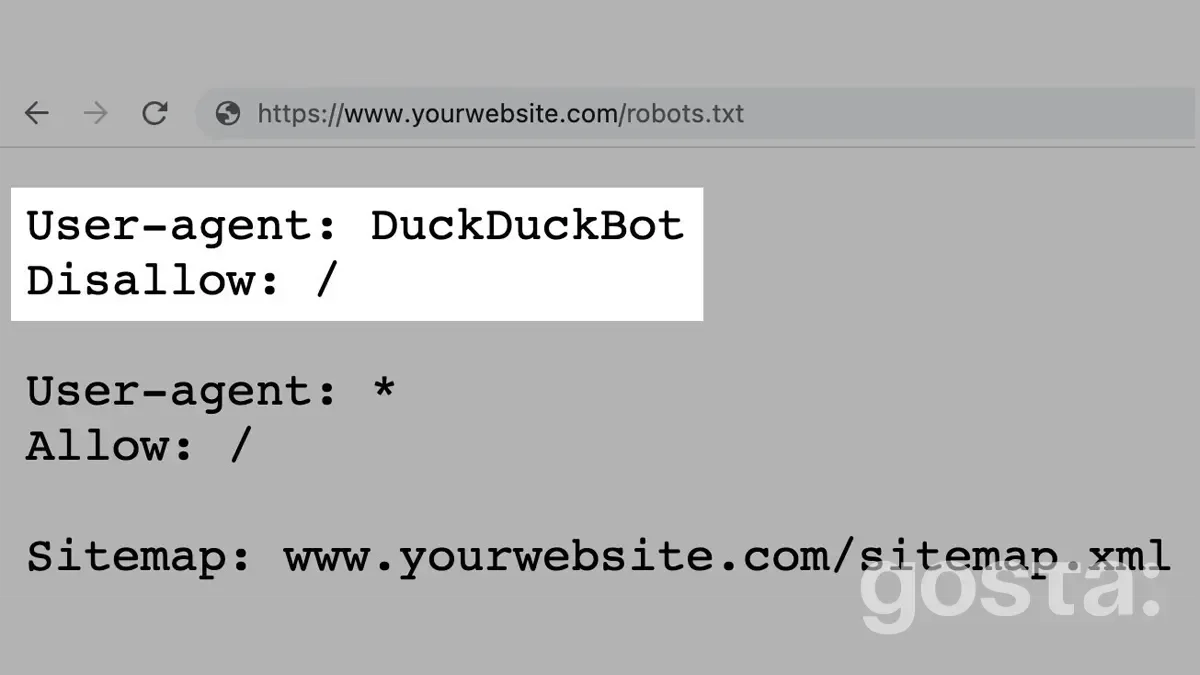
In the robots.txt file, it's crucial to include the User-agent instruction and the Disallow rule, along with a few secondary rules:
- User-agent: Specifies which bots should follow the instructions in the robots.txt file. You can target all systems or only specific ones.
- Disallow: Tells bots which information should not be scanned.
- Allow: Permits scanning of specific pages.
- Sitemap: Informs bots where the URL of the site's sitemap can be found (e.g., https://site.ua/sitemap.xml), helping search engines locate and index all required pages.
- Crawl-delay: Specifies the time interval between page loads. This rule is useful for websites with slower servers, as it can reduce delays when search bots access pages.
- Clean-param: Helps avoid content duplication that might be accessible through different dynamic URLs, such as pages with sorting or session ID parameters.
Note: Google no longer supports the Crawl-delay directive. It is still used by other search engines, such as Bing.
Before filling out the robots.txt file, it's important to understand which symbols can be used and how to apply them correctly. The primary symbols in the file are /, *, $, #.
- A single slash / means we want to block the entire site from being indexed.
- Two slashes // block scanning of a specific directory, for example, /catalog/.
- A single slash followed by a specific name, like /catalog, blocks all links that start with /catalog.
- The asterisk * represents any sequence of characters. For instance, to apply the rule to all bots, you would write **User-agent: ***.
- The dollar sign $ restricts the action of the asterisk, stopping the character sequence.
- The hash symbol # is used for comments, which webmasters can add for their own notes or to remind other team members. Robots ignore comments when scanning the site.
Earlier we wrote: Top 5 Popular Browsers: Review of Speed, Security, and Convenience
Common Mistakes When Filling Out the robots.txt File
Inexperienced webmasters often make mistakes. The most common ones include:
- Confusing instructions, such as specifying bot names in the Disallow rule.
- Writing multiple folders or files in a single Disallow directive. If they are separate folders, each needs its own rule.
- Incorrect file name, such as ROBOTS.TXT instead of robots.txt.
- An empty User-agent rule.
- Extra or incorrectly placed symbols like slashes or asterisks.
How to Create a Robots.txt File – Video
To learn how to create a robots.txt file yourself and see everything in action, watch the video here:
Conclusion
The robots.txt file helps manage the actions of search bots on your website, telling them which pages to index and which to skip. This helps improve the website's search ranking and protects sensitive information from being exposed to the public. A well-crafted robots.txt file can prevent valuable data from leaking onto the web.
Frequently Asked Questions About Robots.txt
Can I Block Google from Indexing Pages Via Robots.txt?
Yes, you can use the Disallow directive for specific pages or directories.
Is it Mandatory to Create a Robots.txt File?
No, it's not mandatory, but it helps control site indexing and reduces bot traffic on the server.
Can I Block All Bots from Accessing My Site?
Yes, you can use the **User-agent: *** and Disallow: / directives in the robots.txt file.