
Following a SpaceX Launch? How to Check the Mission, Window and Live Stream
Following a SpaceX launch is easier when you separate the mission, the planned window, and the status of the actual attempt.

Contents8
- Where should you check the next SpaceX launch?
- What does a SpaceX launch window mean?
- How to find the real SpaceX live stream
- What should you watch during a SpaceX countdown?
- What happens if a SpaceX launch is delayed?
- How to distinguish SpaceX launch, landing and mission success
- What to check before watching a SpaceX launch in person
- FAQ
Following a SpaceX launch is easier when you separate the mission, the planned window, and the status of the actual attempt. A dramatic video in a social feed may be live, a replay, a test, or footage from a different mission. Start with the official mission information before deciding what you are watching.
The most useful SpaceX launch checklist is small: mission name, vehicle, launch location, scheduled date and time zone, current status, and the official broadcast. Keeping those items together prevents a changed countdown or an old clip from turning into an unnecessary mystery.
Where should you check the next SpaceX launch?
Check the next SpaceX launch on the company's official launches page and the mission-specific information linked from it. Use the mission name as your reference point rather than relying only on a generic search for a rocket launch today.
A SpaceX launch can also involve a customer or partner with its own official updates. When a mission is operated for another organization, compare the relevant mission details rather than treating every account using a space-themed profile image as an official source.
Record the date of the SpaceX update. A page announcing a planned SpaceX attempt can be overtaken by a later status message. If two times differ, first check whether one was published earlier or uses a different time zone.
What does a SpaceX launch window mean?
A SpaceX launch window is a period in which the mission is planned to be able to launch under its requirements. It should not be read as a guarantee that liftoff will happen at the first displayed minute.
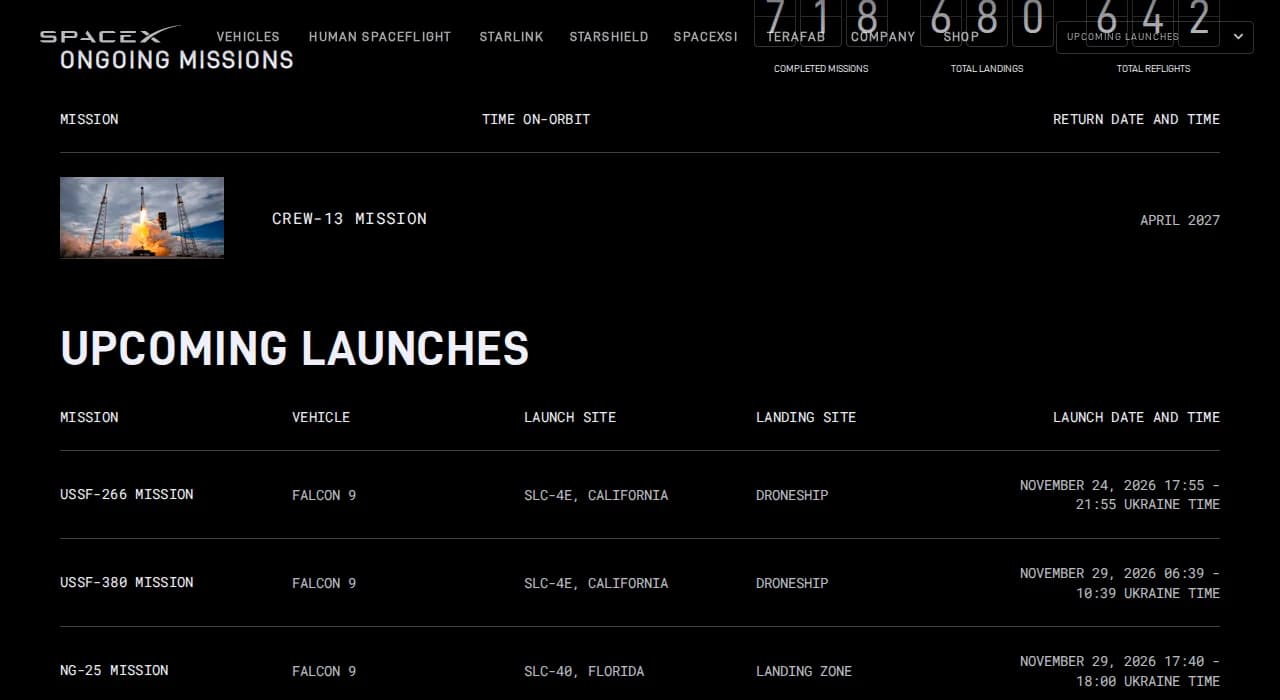
Some mission announcements provide a specific target time; others describe a broader opportunity. Read the actual wording for the SpaceX mission you are following. Avoid turning a window's opening time into a confirmed event time before the attempt takes place.
Time zones deserve their own check. A SpaceX mission listed in UTC, Eastern Time, or local launch-site time can fall on a different calendar day for a viewer elsewhere. Save the original time and convert it for your location instead of copying a number without its label.
SpaceX launch detail | What to record |
|---|---|
Mission | The exact name used by the operator |
Vehicle | The rocket or test vehicle named in the update |
Location | The launch site for this mission |
Time | Date, time zone, and whether it is a target or window |
Status | Scheduled, delayed, scrubbed, launched, or another stated phase |
How to find the real SpaceX live stream
Find the real SpaceX live stream through an official account or a link from the mission page. Check the account identity, stream title, and mission details before assuming that a live badge means the current launch.
A SpaceX replay can be enjoyable and informative, but it should be labeled as a replay. Be cautious with a stream that repeats old footage while presenting an unrelated countdown or asks viewers to send money to take part in a giveaway.
Keep the SpaceX mission reference handy while watching. If the video describes a different launch location, vehicle, or payload from the mission you intended to follow, stop and reconcile the mismatch rather than relying on the title alone.
What should you watch during a SpaceX countdown?
During a SpaceX countdown, watch the official status updates as well as the clock. A countdown display is part of a developing operation. It can hold, reset, or stop while teams assess whether the attempt should continue.
You do not need to interpret every technical call to follow the event. Listen for the broadcaster's explanation of the current phase and distinguish an operational check from an announced problem. A quiet interval is not enough evidence to conclude that a SpaceX mission has failed.
It helps to know what the broadcast says the mission is trying to achieve. A satellite deployment, a crew-related mission, and a vehicle test can have different goals and sequences. Judge the SpaceX event against its stated objectives rather than expecting every broadcast to look identical.
What happens if a SpaceX launch is delayed?
If a SpaceX launch is delayed, look for the next official status and any revised target. A delay does not by itself identify the cause, and it does not necessarily mean the vehicle has suffered damage.
Weather, readiness checks, range requirements, and other mission conditions can affect an attempt. For the SpaceX launch you are following, report only the reason actually stated by the relevant organization. Avoid filling a gap with a confident explanation based on a brief camera view or an anonymous post.
If an attempt is scrubbed, check whether a new date has been confirmed or is still pending. A possible backup opportunity should not become a definite SpaceX launch time in your calendar until the official wording supports it.
How to distinguish SpaceX launch, landing and mission success
Launch, landing, and payload delivery are different parts of a SpaceX mission. A video of one phase does not tell you the outcome of every other phase. Follow the mission's own updates through the relevant milestones.
A SpaceX booster-landing attempt can be a separate event from placing a payload on its intended trajectory. Likewise, a successful liftoff does not mean every later objective is already complete. Be precise about the outcome you are describing.
For a SpaceX test flight, the team may be gathering information about specific systems or phases. Read the stated test goals and later assessment. A dramatic image is not a complete engineering report, whether the reaction online is enthusiastic or disappointed.
What to check before watching a SpaceX launch in person
Before watching a SpaceX launch in person, check the current access rules and public viewing information for the actual location. A place that appears convenient on a map may be closed, private, restricted, or unsuitable during launch operations.
Use local official guidance for road closures and viewing arrangements, and allow for the possibility that the schedule will change after you arrive. Treat a SpaceX viewing trip as a trip with ordinary practical needs as well: transport, weather, water, accessible facilities, and a plan for getting home.
Never interpret a SpaceX social-media viewing suggestion as permission to enter a restricted area. A longer-distance view from an authorized place is preferable to trying to reproduce an impressive photograph from an unknown location.
SpaceX questions
Does the first published SpaceX time guarantee liftoff?
No. Check whether the SpaceX time is a target or a window and follow the latest mission-specific status.
Can an old SpaceX video appear in a live-looking stream?
Yes. Verify the SpaceX mission, date, account, and official link before treating footage as current.
Does a SpaceX booster landing complete the whole mission?
No. Follow the separate milestones and SpaceX's stated objectives for the specific mission. Keep the mission name beside any saved clip so you can identify the event later.
Best of the week — in your inbox
No spam. Only top Gosta stories. Unsubscribe in one click.
Comments